Zero Downtime Deployments: A Practical Guide for Engineers
Zero Downtime Deployments: A Practical Guide for Engineers Zero-downtime deployment means pushing new code to production without any user-visible interruption: in-flight requests complete normally, error rates stay flat, and no one gets a 502.
Zero Downtime Deployments: A Practical Guide for Engineers
Zero-downtime deployment means pushing new code to production without any user-visible interruption: in-flight requests complete normally, error rates stay flat, and no one gets a 502. The short verdict is this — pick the simplest strategy that satisfies your SLOs and budget. Most teams reach for canary releases or blue/green deployments when a rolling update or even an atomic symlink swap would have done the job cleanly.
Every approach in this guide depends on three non-negotiable prerequisites: readiness and liveness health checks that gate traffic until a new instance is genuinely ready, graceful shutdown that drains in-flight requests before a process exits, and enough observability to know within 60 seconds whether a deploy is healthy. Without those three, no strategy is safe regardless of how sophisticated the orchestration is.
This guide covers:
-
The five primary deployment strategies and their tradeoffs
-
Database and schema migration patterns that preserve compatibility
-
Traffic routing, connection draining, and session handling
-
Observability baselines, SLO-driven gating, and automated rollback
-
Testing, staging, and canary sizing recipes
-
A decision framework for choosing the right strategy
-
Practitioner rules of thumb and common anti-patterns
-
A copy-ready operational playbook
-
Third-party dependencies, microservice compatibility, rollback, and security
Table of Contents
-
Operational playbook: your zero-downtime deployment checklist
-
Managing third-party dependencies and external API versioning
-
Ridiculousengineering can audit and implement your deployment practice
What zero downtime deployments actually require
Zero-downtime deployment is a release strategy where a new version replaces the old without any period of unavailability. That definition sounds simple. The implementation is where teams run into trouble, because the strategy you choose determines your infrastructure cost, rollback speed, and risk profile for every release you ship.
The five primary strategies compared
Blue/green deployments maintain two identical environments. Blue is live; green receives the new version. Once green passes validation, a load balancer or DNS record shifts all traffic in a single atomic operation. Blue/green deployment offers instant rollback by routing traffic back to blue, which still runs the previous version untouched. The cost is roughly double the infrastructure during the transition window.

Canary releases route a small percentage of production traffic to the new version, evaluate behavior against SLOs, and gradually increase the percentage. Canary releases limit blast radius but demand strong observability and automation for rapid promote/rollback decisions. They are the right choice for high-traffic APIs where even a 1% error rate spike is meaningful signal.
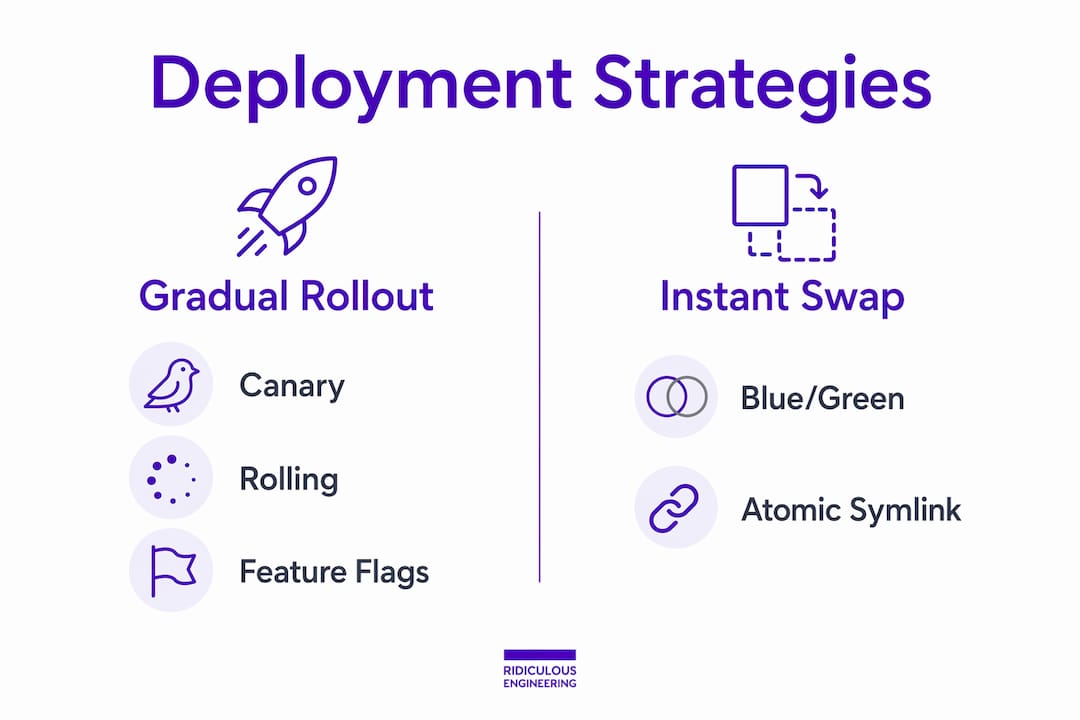
Rolling updates replace instances of the old version with the new version gradually, one batch at a time, while traffic continues flowing to unchanged instances. Kubernetes implements this natively with maxUnavailable: 0 and maxSurge: 1 for true zero-downtime behavior. The catch: rolling deployments require backward- and forward-compatible code and database schemas because both versions run simultaneously during the transition.
Feature flags decouple deployment from release. Code ships to production with a flag disabled; the feature activates separately, for 1% of users, then 10%, then 100%, without any redeployment at each stage. This is one of the highest-leverage practices available regardless of which deployment strategy you pair it with.
Atomic symlink deployments create a new release directory, build it fully offline, then switch a current symlink in a single rename syscall. Atomic symlink swaps provide sub-second, truly atomic cutovers on single-server or small-fleet apps and are often the simplest way to achieve zero downtime for such environments. Rollback is re-pointing the symlink.
Strategy comparison
| Strategy | Infrastructure cost | Rollback time | Risk profile | Best for |
|---|---|---|---|---|
| Atomic symlink | Minimal | Sub-second | Very low | Single-server, small fleets |
| Rolling update | Low (surge capacity only) | Seconds to minutes | Low-medium | Fleets with compatible DB schemas |
| Blue/green | ~2x during transition | Seconds (LB flip) | Low | Regulatory needs, low risk tolerance |
| Canary | Low-medium | Seconds (traffic shift) | Low (limited blast radius) | High-traffic APIs with strong observability |
| Feature flags | Minimal | Instant (flag toggle) | Very low | Risky UI/backend changes, gradual rollouts |
Pro Tip: Many teams choose complex orchestration when a simpler technique would meet their SLO and budget. Start with atomic symlink or rolling updates. Graduate to blue/green or canary only when your traffic profile, rollback requirements, or regulatory constraints genuinely demand it.
Database migrations are the hardest part
Schema changes break zero-downtime because old and new application code coexist during a rollout. A column rename that the new code expects will crash the old instances still serving traffic. A NOT NULL constraint added before data is backfilled will reject writes from the old version. This is the most common zero-downtime failure mode, and it has a well-understood solution.
The expand-contract pattern treats schema changes as a three-deploy sequence:
-
Expand: Add the new column as nullable (backward-compatible with old code). Run
CREATE INDEX CONCURRENTLYfor any new indexes. Deploy no application code changes yet. -
Transition: Deploy new application code that writes to both old and new columns simultaneously (dual writes). Run batched data backfills in small transactions to avoid table locks. Validate data consistency.
-
Contract: Once all instances run new code and data is fully migrated, remove the old column in a separate deploy. Apply NOT NULL constraints only at this stage.
Each phase is independently deployable and independently rollback-able. No single deploy ever requires the schema and the application code to change at the same time.
Pro Tip: Never bundle a destructive schema operation (DROP COLUMN, RENAME COLUMN, adding NOT NULL to an existing column) into the same deploy as application code. Treat schema changes as their own release with their own rollback plan.
Additional mitigations worth building into your migration workflow:
-
Use
CREATE INDEX CONCURRENTLYto avoid table-level locks during index creation -
Add new columns as nullable first; apply constraints only after backfill completes
-
Run backfills in batches of 1,000–10,000 rows with short sleep intervals between batches
-
Test migration scripts against a production-sized staging database before running in production
-
Maintain schema-version compatibility tests in your CI pipeline
How traffic routing actually accomplishes zero-downtime
Load balancers and service meshes are the mechanism that makes cutover invisible to users. Understanding their behavior during a deploy prevents the most common traffic-management mistakes.
When you shift traffic in a blue/green setup, the load balancer (an AWS ALB, an NGINX upstream, or a service-mesh routing rule) updates its target group or weighted route. Requests already in flight to the old target group complete normally; new connections go to the new target group. The key operational variable is the drain window: the time the load balancer waits for in-flight requests to complete before forcibly closing connections to a deregistered instance.
Set your drain window to at least your p99 request latency, plus a small buffer. If your p99 is 800ms, a 5-second drain window is safe. A drain window shorter than p99 will drop requests during cutover regardless of how careful your deployment logic is.
DNS-based cutover is slower and less predictable. TTL propagation means some clients will continue hitting the old environment for minutes or hours after you update a DNS record. For most production systems, load-balancer-level traffic shifting is the right tool; DNS cutover is acceptable only for environments where a brief period of split traffic is tolerable.
Sticky sessions create a specific hazard. Session affinity at the load balancer pins a user to a specific instance, which means some users stay on the old version longer than others during a rolling update. The safer approach is to store session state externally (Redis, a database-backed session store) so any instance can serve any user. If sticky sessions are unavoidable, plan for a longer drain window and test session continuity explicitly during staging.
Pro Tip: Configure your readiness probe to return a non-200 status until the application has completed its warm-up sequence, including any cache priming or connection pool initialization. Premature traffic routing to a cold instance is a common source of latency spikes at deploy time.
Checklist for traffic cutover:
-
Drain window set to p99 latency plus buffer
-
In-flight request timeout configured on the application side
-
Readiness probe validated against actual warm-up time
-
Sticky-session scope documented and mitigated with external session storage where possible
Automation and observability are the safety foundation
A deployment strategy without automated verification is a strategy that depends on someone watching a Grafana dashboard at 2 AM. That is not a process; it is a hope.

The minimum CI/CD pipeline for a safe rollout includes: build and unit test, integration test against a staging environment that mirrors critical dependencies, deploy to the idle environment (or begin the rolling update), health-check gating before any traffic shifts, synthetic smoke test against the new version, and automated rollback trigger if gates fail.
The observability baseline you need before running any of these strategies in production:
-
Error rate: HTTP 5xx rate per service, measured at the load balancer and at the application layer
-
p95/p99 latency: measured per endpoint, not just as an aggregate
-
Success rate: for critical business transactions (checkout completion, login, payment processing)
-
Saturation signals: CPU, memory, connection pool utilization on new instances
Canary promotion needs automated checks for error ratios, latency, and business metrics to avoid slow human gating. A practical automated rollback trigger looks like this: if the error rate on the canary exceeds the baseline by more than 0.5% for two consecutive 30-second evaluation windows, roll back automatically and page the on-call engineer. The two-window requirement filters out transient spikes that would otherwise cause noisy false rollbacks.
SLOs and error budgets drive canary duration directly. If your SLO is 99.9% availability and you are consuming error budget at twice the normal rate during a canary, that is your signal to roll back, not to wait for a human to notice. Teams that wire their canary promotion logic to error budget burn rate catch regressions faster and with less manual intervention.
Pro Tip: Observability is the safety foundation — without meaningful health checks and metrics, even safe strategies like canary can create degraded experiences for subsets of users. Instrument before you deploy, not after an incident.
Testing and safe rollout recipes
Pre-deploy validation is not optional. Run your full automated test suite, integration tests against staging mirrors of critical dependencies, and a smoke test that exercises the happy path of your most important user flows. If any of these fail, the deploy does not proceed.
The canary is not a testing environment. It is a production verification step. If your pre-deploy tests are weak, a canary will catch bugs in production — which is better than catching them for all users, but worse than catching them before any user sees them.
For canary sizing, a practical traffic progression is 1% → 5% → 25% → 100%, with evaluation windows between each step. How long should each window be? It depends on your deploy frequency and metric signal latency. If you deploy multiple times per day and your error rate metrics update every 30 seconds, a 5-minute window at 1% is sufficient to catch most regressions. If you deploy weekly and your business KPIs take 10 minutes to stabilize, extend the window accordingly. The Google SRE canary workbook recommends tying canary duration to the time needed for your slowest meaningful signal to stabilize.
Load-testing during deployment is underused. Simulate your expected peak traffic against the new version in staging before promoting to production. Verify that error rates stay flat and p99 latency does not degrade under load. This catches resource-sizing regressions that unit tests will never surface.
For low-velocity teams (fewer than one deploy per week), a short manual gate between canary steps is acceptable. An engineer reviews the dashboard, confirms the metrics look clean, and approves the next step. For high-velocity teams, that manual step becomes a bottleneck and a liability. Automate the gate.
Pro Tip: Run load tests against your staging environment using production-representative traffic patterns, not synthetic uniform load. Real traffic has bursts, long-tail endpoints, and edge cases that uniform load misses entirely.
How to choose the right strategy for your situation
The decision is not about which strategy is “best.” It is about which strategy is the least complex option that satisfies your specific constraints.
Work through these questions in order:
-
Do you run a single server or a small fleet? Atomic symlink is your answer. Add a process manager (systemd, Supervisor) that handles graceful reload, and you are done.
-
Do you have a fleet with a compatible DB schema? Rolling updates with readiness probes and graceful shutdown cover the vast majority of production deployments.
-
Do you have very low risk tolerance or regulatory requirements? Blue/green gives you the cleanest rollback story and the most auditable cutover.
-
Do you have high traffic, strong observability, and automated metric gates? Canary is worth the investment and gives you the smallest blast radius.
-
Are you making a risky UI or backend change that you want to decouple from the deploy? Feature flags, regardless of which deployment strategy you use.
Red flags that push you toward safer, more conservative strategies:
-
p99 request latency above 2 seconds (long drain windows required; rolling updates become slow)
-
Frequent complex schema changes (expand-contract discipline is mandatory; blue/green simplifies the rollback story)
-
Many tightly coupled services that must deploy in coordination (feature flags help; canary becomes harder to reason about)
-
No meaningful production metrics within 60 seconds (canary is unsafe without fast signal)
Simple mapping: atomic symlink for single-server apps, rolling for fleets with compatible schemas, blue/green for low-risk-tolerance or regulated environments, canary for high-traffic APIs with strong observability and automated gates.
Practitioner rules of thumb and anti-patterns to avoid
These are the lessons that show up in post-mortems, not in documentation.
Rules of thumb worth internalizing:
-
Keep the number of concurrent live versions as low as possible during a canary. Each extra version increases debugging complexity and makes incident attribution harder.
-
Set your graceful shutdown timeout slightly higher than your p99 latency. If p99 is 800ms, use a 2-second shutdown timeout. This gives in-flight requests room to complete without holding up the deploy indefinitely.
-
Prefer additive database changes. Adding a column is safe. Renaming or dropping one is a multi-deploy operation.
-
Use feature flags for any change that carries meaningful user-facing risk, even when the deployment itself is low-risk.
Common anti-patterns:
Version sprawl happens when teams run canaries for too long without automated promotion logic. You end up with three or four versions in production simultaneously, each with slightly different behavior, and debugging any issue requires knowing which version a given request hit.
Human-gated promotion defeats the purpose of a canary. If promoting from 5% to 25% requires an engineer to manually review a dashboard and click a button, you have introduced human reaction time as a variable in your safety net. Automate the gate.
Coupling schema changes to feature toggles poorly is a subtle one. If a feature flag controls a code path that writes to a new column, and you toggle the flag before the column exists in production, you get errors. The sequence matters: schema change first, code deploy second, flag enable third.
The teams that handle deploys most reliably are not the ones with the most sophisticated tooling. They are the ones with the clearest runbooks, the most disciplined change sequencing, and the fastest feedback loops. Sophistication without discipline creates incidents.
Ridiculousengineering has worked through these patterns with clients across industries, from e-commerce platforms handling high-traffic sales events to regulated data systems where rollback speed is a compliance requirement. The consistent finding: teams that adopt iterative delivery practices and keep changes small ship more reliably than teams that batch changes and rely on heroics during deploy windows.
Operational playbook: your zero-downtime deployment checklist
Copy this into your incident runbook and adapt it to your stack.
Pre-deploy
-
Confirm all automated tests pass in CI (unit, integration, smoke).
-
Run migration dry-run against a production-sized staging database; verify no locking operations.
-
Confirm observability dashboards are live and baseline metrics are captured.
-
Verify readiness probe endpoint returns 200 on the new build.
-
Confirm drain window is configured correctly on the load balancer.
-
Identify the rollback owner (who executes the rollback if needed).
Deploy
-
Start new instances (or begin rolling update); do not route traffic yet.
-
Wait for readiness probes to pass on all new instances.
-
Shift initial traffic (1% for canary, or begin rolling batch for rolling update).
-
Monitor error rate and p99 latency for the first evaluation window.
-
If metrics are clean, continue traffic shift per your canary progression or rolling batch schedule.
-
Run synthetic smoke test against the new version under live traffic.
Post-deploy
-
Confirm error rate and latency have returned to baseline across all instances.
-
Verify business KPIs (conversion rate, transaction success rate) are stable.
-
Keep the previous version available for rollback for at least one full traffic cycle.
-
Document any anomalies observed during the deploy.
Emergency rollback
-
Kubernetes rolling update:
kubectl rollout undo deployment/my-app -
Blue/green (AWS ALB):
aws elbv2 modify-listenerto point back to the blue target group -
Atomic symlink:
ln -sfn releases/previous current && systemctl reload app -
Canary (traffic shift): Set canary weight to 0% at the load balancer or service mesh
Rollback owner executes the appropriate command. On-call engineer notifies upstream and downstream service owners if an external dependency is affected.
Managing third-party dependencies and external API versioning
Third-party dependencies introduce a version-compatibility problem that your deployment strategy alone cannot solve. When you upgrade a dependency or change how you call an external API, both the old and new versions of your application may be in production simultaneously during a rolling update or canary.
The practical approach is to treat external API calls as versioned contracts. Pin the API version in your client configuration (/v2/endpoint rather than /latest), and maintain backward compatibility in your own API responses for at least one full deploy cycle. If you are migrating from one external API version to another, use the same expand-contract logic you apply to database schemas: write to both versions simultaneously during the transition, then cut over cleanly.
For third-party SDKs and libraries, lock dependency versions in your package manifest and test upgrades in isolation before including them in a feature deploy. A dependency upgrade that changes behavior is a separate deploy from the feature that motivated it. Bundling both together makes rollback ambiguous.
If a third-party service has its own planned maintenance window, coordinate your deploy schedule to avoid overlapping. A deploy that coincides with a payment processor’s maintenance window is a support ticket waiting to happen.
Backward and forward compatibility in microservices
In a microservice architecture, zero-downtime deployment requires that services can communicate correctly across version boundaries. During a rolling update, Service A v2 may call Service B v1, or vice versa. Both combinations must work.
Backward compatibility means new code can handle requests from old clients. Achieve this by never removing or renaming fields in API responses without a deprecation period, using additive-only changes (new optional fields, new endpoints), and versioning your API explicitly.
Forward compatibility means old code can handle responses from new services. This is harder. The safest approach is to design consumers to ignore unknown fields (tolerant reader pattern) and to avoid making old clients dependent on the absence of new fields.
Protobuf and Avro schemas enforce these contracts at the serialization layer, which is why they are common in high-velocity microservice environments. For REST APIs, OpenAPI schema validation in your CI pipeline catches breaking changes before they reach production.
Consumer-driven contract testing (tools like Pact) lets each consumer define what it expects from a provider, and the provider’s CI pipeline verifies those contracts on every build. This catches compatibility breaks before any service deploys, not during a production canary.
Rollback and disaster recovery after deployment failures
A deployment strategy without a tested rollback plan is incomplete. The rollback commands in the playbook above are the tactical layer. The strategic layer is making sure rollback is fast, unambiguous, and practiced before you need it under pressure.
Rollback prerequisites:
-
The previous version must be available and deployable without rebuilding (keep the last two container image tags or release directories)
-
Database migrations must be independently reversible (or the schema must remain compatible with the previous application version)
-
Rollback must be executable by a single engineer without approval gates during an active incident
Disaster recovery considerations beyond rollback:
If a deploy corrupts data (a buggy migration writes invalid values, for example), rollback of the application code does not fix the data. This is where RPO matters: how much data loss is acceptable, and do you have point-in-time database backups at a granularity that covers your deploy window? For most production systems, continuous WAL archiving (PostgreSQL) or binary log shipping (MySQL) provides the granularity needed to recover to a pre-deploy state.
Pair your deployment runbook with a security and incident response plan that covers data integrity failures, not just availability failures. The two failure modes require different recovery paths.
Test your rollback procedure in staging at least once per quarter. A rollback you have never practiced is a rollback that will take three times as long when you actually need it.
Security considerations during zero-downtime deployments
Secrets management is the most common security gap in deployment automation. When a new version of your application starts, it needs credentials: database passwords, API keys, TLS certificates. How those secrets reach the new instance determines your security posture.
Never bake secrets into container images or environment variables set at build time. Use a secrets manager (AWS Secrets Manager, HashiCorp Vault, GCP Secret Manager) and inject secrets at runtime via the orchestration layer. This means a compromised image does not expose credentials, and rotating a secret does not require a rebuild.
During a blue/green or rolling deploy, both versions may be running simultaneously with different secret versions. If you rotate a database password mid-deploy, the old instances lose connectivity. The safe sequence: rotate secrets before the deploy begins, verify both old and new application versions can authenticate with the new credentials, then proceed with the traffic shift.
Rolling back a security patch requires careful thought. If you roll back application code that included a security fix, you are re-exposing the vulnerability. The decision to roll back must weigh the severity of the production incident against the severity of the security regression. For critical vulnerabilities (CVSS 9+), a targeted hotfix forward is usually preferable to a full rollback. Document this decision tree in your runbook before you need it.
TLS certificate rotation during a deploy is another edge case. If you are rotating certificates as part of a deploy, verify that both the old and new application versions trust the new certificate before cutting over. A certificate that the old version does not trust will cause connection failures during the transition window.
Key Takeaways
The single most important principle: pick the simplest deployment strategy that satisfies your SLOs and budget, and invest in health checks, graceful shutdown, and observability before adding orchestration complexity.
| Point | Details |
|---|---|
| Start simple | Atomic symlink or rolling updates satisfy most production SLOs without the overhead of blue/green or canary. |
| DB migrations need three deploys | Use expand-contract: add columns first, dual-write second, remove old structures third — never bundle schema and code changes. |
| Automate your rollback triggers | Set error-rate thresholds and latency gates; manual promotion workflows defeat the speed and safety canary releases provide. |
| Observability gates everything | Without p99 latency and error-rate metrics updating within 60 seconds, no canary strategy is safe to run in production. |
| Ridiculousengineering can help | Ridiculousengineering designs and implements CI/CD pipelines, SLO-driven observability, and DB migration playbooks for teams that need production-ready deployment practices. |
Ridiculousengineering can audit and implement your deployment practice
Shipping without downtime is a solvable engineering problem, but the solution looks different for every team depending on stack, traffic profile, and risk tolerance. Ridiculousengineering’s custom software development practice includes hands-on deployment automation work: CI/CD pipeline design, SLO-driven observability setup, database migration playbooks, and runbook creation for incident response. We treat your environment as unique and recommend the simplest approach that meets your goals, not the most impressive-sounding one. Clients come away with repeatable deployment processes, measurable SLO improvements, and lower incident MTTR. If your team is navigating a tricky migration, a legacy modernization, or a first-time zero-downtime implementation, reach out for a scoped engagement and we will tell you plainly what we think the right approach is.
FAQ
What does zero downtime deployment mean?
Zero-downtime deployment means releasing new application code to production without any user-visible interruption: in-flight requests complete normally, error rates stay flat, and no maintenance window is required.
Which deployment strategies achieve zero downtime?
Rolling updates, blue/green deployments, canary releases, atomic symlink swaps, and feature flags all achieve zero downtime when implemented with proper health checks and graceful shutdown. The right choice depends on your infrastructure, traffic volume, and rollback requirements.
How do you deploy without downtime when database migrations are involved?
Use the expand-contract pattern: add new columns as nullable first, deploy code that writes to both old and new structures, then remove old structures in a separate deploy. Never bundle a destructive schema change with an application code deploy.
What is the simplest zero-downtime approach to start with?
A rolling update with maxUnavailable: 0 and maxSurge: 1, a readiness probe on a /health endpoint, and a preStop sleep hook for graceful shutdown covers the majority of production deployments with minimal implementation overhead.
Useful sources
| Source | What it covers |
|---|---|
| Google SRE Canary Workbook | Authoritative guidance on canary sizing, automated gates, and SLO-driven promotion logic |
| Martin Fowler: CanaryRelease | Practitioner essay on canary patterns, version limits, and blast-radius control |
| Out Plane: Zero-Downtime Deployment Guide | Comprehensive implementation guide covering health checks, graceful shutdown, and DB migrations |
| DeployHQ: Zero Downtime Deployments | Practical guide including atomic symlink patterns and SLO/RTO/RPO guidance |
| Kubernetes: Rolling Update Docs | Official reference for maxUnavailable, maxSurge, and rollback commands |
| Wikipedia: Blue/Green Deployment | Canonical definition and platform-specific implementation notes (AWS, GCP, Azure, Kubernetes) |
| JetBrains: Canary Release Guide | CI/CD-focused canary implementation with automated gate recommendations |